How to choose cleaning software for your operation

Wondering how to choose cleaning software without getting distracted by a polished demo? Start with the work your teams do, then compare suppliers against the same criteria, costs and rollout plan. This guide gives cleaning contractors a weighted scorecard, warning signs and questions to use before signing. FacilityApps develops software for cleaning operations, including planning, work orders and quality control, so these examples reflect the workflows operators need to test. (facilityapps.com)
In short: Map a real job from scheduling to client reporting, score each product against that workflow, and test it with the people who will use it. Check costs and rollout responsibilities before you commit.
1. Match the criteria to your stage and workflow
Choose criteria based on where work breaks down today. A smaller contractor replacing paper job sheets may prioritise simple mobile work orders and clear handovers. An operator managing multiple sites may need to check how schedules, completed work, inspections and client reports connect. Your business stage changes the weighting, not the need to test the full workflow.
Write down a real sequence: assign a cleaner, record completion, flag an issue, arrange a return visit and show the client what happened. Ask each supplier to demonstrate that sequence using your roles and a realistic site. If staff must re-enter the same information, note where and why. Planning, work orders and quality checks are distinct parts of this process; a feature list alone does not show how they work together. (facilityapps.com)
2. Score the software against the same evidence
Use a scoring matrix (a weighted comparison of agreed criteria) before the demos. As an illustrative weighting, give workflow fit 35%, ease of use 25%, reporting and evidence 15%, integrations 15% and total cost 10%. Change those weights to match your operation. Score every supplier from 1 to 5 on each criterion, multiply by its weight and add the results. Agree on the weights before seeing prices.
Give a high workflow-fit score only when staff can complete your test job without an undocumented workaround. Ask a cleaner and a supervisor to perform their own tasks rather than watching a sales presentation. Keep a note beside each score: what you saw, what still needs testing and what the supplier said would require configuration. Establishing criteria and their relative importance before comparing alternatives follows recognised decision-analysis practice. (stage.cmmiinstitute.com)
3. Check warning signs in the demo
Treat an untested promise as a question, not a capability. Warning signs include a demo limited to ideal conditions, an issue that cannot be traced from report to resolution, unclear charges for setup or support, and an integration described as possible without showing how data moves.
Ask the supplier to repeat a failed or changed job: the cleaner cannot complete a task, the supervisor reassigns it and the client requests proof. Can each person see the right status? Can you retrieve the record later? If the answer depends on a future release or manual spreadsheet, record that against your criteria rather than assuming it will be solved during rollout.
4. Ask suppliers about costs and responsibilities
Put the same questions to every shortlisted supplier. Which parts of our test workflow work now? What needs configuration? How will existing site, employee and job data be imported and checked? Which integrations have been tested with our systems? What can we export if we leave?
Then ask who trains cleaners and supervisors, who handles problems during launch and what happens if staff cannot use the app at a site. Request a written breakdown of subscriptions, setup, training, support and any charges tied to users or modules. For data protection, ask what evidence the supplier can provide about its security practices; supplier due diligence is a recognised part of software procurement. (csrc.nist.gov)
5. Test adoption before a wider rollout
Begin with one representative site and a real mix of roles. Give staff the same tasks they would perform on a normal shift, then check whether jobs, issues and follow-up appear correctly for supervisors. Record the extra work needed to correct data or help users.
An adoption hurdle (a practical barrier that stops staff using the system) may be unclear instructions, limited access at a site or a task that takes longer than the existing method. Resolve those issues before adding sites. Agree with the supplier who owns data cleanup, training and support, and decide what evidence would make you pause the rollout. Adoption is best assessed through actual use and proficiency, not training attendance alone. (prosci.com)
The answer to how to choose cleaning software is to test your real workflow, compare documented evidence with a weighted scorecard and make rollout risk part of the decision. Use the same test job and questions for every supplier before selecting a pilot.
Frequently asked questions
How should a cleaning contractor choose the right software?
Start with a real job and identify where scheduling, completion, quality checks or reporting need improvement. Set weighted criteria before demos, have cleaners and supervisors test their own tasks, and compare written answers on costs, integrations and rollout support. Pilot the shortlisted system at a representative site before expanding.
Related posts

Cleaning operations software for planning, quality and delivery
Cleaning operations software that runs planning, work orders, quality control and reporting for cleaning companies from 20 employees upward.

Best software for cleaning companies: a founder’s view
The best software for cleaning companies is the system that helps your people make reliable decisions across sites, not the one with the longest feature list.
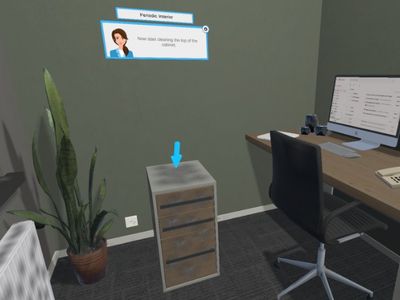
Cleaning Workx, powered by FacilityApps, launches new 'Periodic Cleaning' training modules
Cleaning Workx introduces the Periodic Interior and Periodic Sanitary modules — the most requested addition among existing customers. Available immediately in 18 languages as part of the core platform.